
Game area
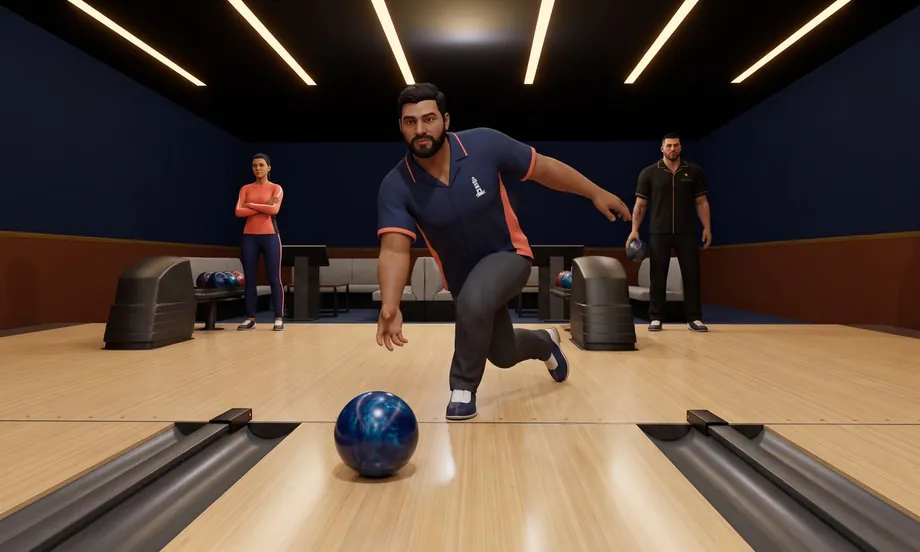
Bowling Simulator
The game loads right here — no download needed.
In every Selminha game: P to pause · M to toggle sound · SPACE or tap to startAbout Bowling Simulator
This is real bowling in a 3D bowling center. Every shot is simulated from the moment the ball leaves your hand until the last pin settles: the ball skids through the oil, grips the dry back end and hooks into the pocket, and every pin bounces off the others, the kickbacks and the deck just like on a real lane. Your ball changes the shot: the coverstock (plastic, urethane, solid, pearl or hybrid) decides how much it hooks and where; the weight, from 10 to 16 pounds, changes the speed and the hit on the pins; and your style (straight, classic, power or spinner) and your bowling hand, right or left, change the spin. You aim by dragging sideways and roll by swiping up: the faster the swipe, the harder the ball, and curving the end of the swipe puts a hook (or a backup) on it. Scoring follows the official rules: ten frames, strikes and spares with bonus pins, up to three balls in the tenth frame, splits circled on the scoreboard and a foul when your foot crosses the line. It's always a five-way match, each bowler on their own lane: against the computer, you take on the club members (Diego, Valentina, Niklas, Mateo and Hugo), each with their own style, at three skill levels; with friends, 2 to 5 of you can take turns on one device or all bowl at the same time, each on your own device, by link, and the computer takes any open lanes. In the bowling center, every lane has its own monitor with the score, the pinsetter resets the pins, the ball return brings your ball back, strikes get an instant replay, and Don Tomás, sitting at the back, applauds every strike and spare. Finish a full game without the computer bowling for you and you can make the top-5 leaderboard.
In Selminha's words
“Real bowling is all physics: the ball that skids through the oil and turns at the back end, the pin that takes out two more. I wanted a simulator like that right in your browser, even on your phone, where the flick of your finger becomes speed and hook, and the lanes next to you are always busy, like a packed bowling center. It's another game from Podium Bay, our seaside sports club.”
How to play Bowling Simulator and official scoring
- On the menu, choose how you want to play (against the computer, friends on this device or friends by link), who's bowling and the computer's difficulty, then tap START. In your first game, the HOW TO BOWL lesson walks you through the swipe step by step; you can always open it from the button in the bottom-left corner.
- The ball button in the bottom-left corner lets you set the coverstock, weight, bowling hand and style. The diagram shows the path the ball will take down the lane.
- To aim, drag sideways: your bowler moves along the approach and picks where the ball comes off the hand. To roll, swipe up and let go (with a mouse, drag up fast): the faster you go, the harder the ball. Curve the end of the swipe toward the pocket for a hook, or swipe straight for a straight ball, the best choice for spares.
- Playing with friends on one device, everyone bowls on their own lane, one at a time: when the turn changes, pass the device. Each shot has a 45-second clock; if time runs out, that ball counts as zero.
- Playing friends by link: tap “Friends by link,” type your name and set up the game, then copy or share the link. Whoever opens it picks a bowler nobody else has taken and joins; once at least one friend is in, tap START, and the computer takes the open lanes. Everyone bowls at the same time, each on their own lane, and up to 50 people can watch. At the end, if everyone says yes, a new game starts.
- Tap the standings to see the full scoreboard, with all ten frames for all five bowlers. The pause button opens the menu, and the speaker button turns the sound on and off.
Full rules for Bowling Simulator
More games to play with friends online
Your ball
- Plastic
- Barely hooks: the spare ball.
- Urethane
- A small, early hook that is easy to control.
- Solid
- Grips early and hooks hard all the way down.
- Pearl
- Skids through the oil and turns hard at the end.
- Hybrid
- The strongest hook, on the back end.
- Weight
- 10 to 16 pounds. A lighter ball leaves your hand faster; a heavier one deflects less on the pins and knocks down more.
- Style
- Straight (no revs), classic (the standard hook), power (lots of revs and a big hook) or spinner (rotates on its side, skids and hooks a little). Your bowling hand, right or left, sets which way the ball hooks.
Scoring
- Strike
- All ten pins on the first ball of a frame: worth 10 plus the pins from the next two balls. Two in a row is a double; three, a turkey.
- Spare
- Knocking down the pins left standing with the second ball: worth 10 plus the pins from the next ball.
- Split
- The headpin falls and the pins left standing have a gap between them: the scoreboard circles it.
- Foul
- Your foot crossed the line: the ball counts, but its pins don't. The scoreboard marks an F.
- Gutter ball
- The ball dropped into the gutter without hitting a pin: the scoreboard marks a G.
- The tenth frame
- A strike or a spare earns you extra balls in the same frame, up to three in all.
Controls on phone and computer
- Computer
- Drag sideways (with your finger or the mouse) to aim: your bowler moves along the approach · swipe up and let go to roll (with a mouse, drag up fast); the faster you go, the harder the ball, and curving the end of the swipe adds hook · the ball button in the bottom-left corner sets the coverstock, weight, bowling hand and style · the HOW TO BOWL button opens the lesson · tap the standings to open the full scoreboard · the pause button opens the menu, and the speaker button turns the sound on and off · on a keyboard: ← → (or A and D) aim, Space or Enter rolls the ball with your style's hook, P or Esc pauses and M turns the sound on and off · on a controller: the left stick or the D-pad aims, A rolls the ball, START pauses and BACK turns the sound on and off.
- Touch
- On phones, the game is played in portrait mode and in full screen; on tablets, in portrait or landscape. You aim and roll with your finger, and the ball and HOW TO BOWL buttons sit in the bottom-left corner, out of the way of your swipe.
Game modes
- Against the computer
- You and the four club members, each on their own lane, at three skill levels: beginner, intermediate and pro.
- Friends on this device
- 2 to 5 of you, each on your own lane, taking turns, with 45 seconds per shot; the computer bowls on any open lanes.
- Friends by link
- 2 to 5 of you, each on your own device and lane, all bowling at the same time; the computer fills the open lanes, and up to 50 people can watch.
- Leaderboard
- Finish a full game without the computer bowling for you and you can make the top-5 leaderboard; with friends on one device, your group's best game counts.
Tell us what happened, or what you'd change. Your message goes straight to Selminha, and you'll get a reply by email.
More games to discover
Your next discovery could be right here.

Pool Simulator
A pool simulator with real physics and the complete rules: spin, massé and jump shots that play like they do on a real table, a referee who calls every foul, and twelve disciplines, from Mata-Mata to artistic pool. Play against the computer or a friend, on the same device or by link.
Play
Scrapyard Run
Skate down the junkyard highway as Kiko Faísca: dodge or hop barrels, tires and oil slicks, hit the ramps and grab turbo cans — and outlast the Driver's cage truck when it pulls in ahead and dumps junk on the road. An endless race played in portrait mode, from the Steel Flames franchise.
Play